Redesign your Django Admin experience.
A drop-in theme booster built with Tailwind CSS, progressive Javascript enhancements, AJAX-driven updates, and a productivity-first command palette.
Why choose DjangoAdmin.JS?
We have combined the robustness and stability of Django's native administration with modern frontend paradigms and visual enhancements.
Seamless AJAX Navigation
Say goodbye to full page refreshes. The built-in PJAX engine intercepts searches, filters, pagination, and navigation to update the workspace content instantly in milliseconds.
Spotlight Command Palette
A quick Spotlight/Raycast-like launcher. Effortlessly search through models, trigger quick actions, or execute design commands like `/style glassmorphism` on the fly.
Premium Tailwind CSS UI
A complete, modern redesign built with Tailwind utility classes. Fully responsive across all devices, featuring elegant typography, custom themes, and clean spacing.
3 Dynamic Layout Styles
Switch presets instantly: **Default** (rounded cards and soft shadows), **Glassmorphism** (frosty backdrop-blur panels), or **Minimalist** (high contrast borderless fields).
Asynchronous Forms & Actions
Form submissions, editing, and object deletions are handled in the background. Includes instant inline validation states and floating success toast notifications.
Unified Global Configuration
Control all library behaviors from a single `DJANGO_ADMIN_JS` settings dictionary. Customize default themes, toggle instant search, or disable the style picker.
Header Language Switcher
Change languages instantly using a gorgeous header dropdown. Supports flag icons via the `flag-icons` library, Font Awesome class selectors, or raw Emojis.
Modal-Driven Inline Forms
No more cluttered rows. Tabular inline items are listed cleanly, and adding or editing records triggers dynamic, beautiful overlay popups for an app-like experience.
Interactive Column Sorting
Refined multi-column sorting layout. Shows clear priority badges and direction indicators, with an optional reset button appearing elegantly on hover.
Secure Python Web Shell
Run Python commands in real-time. Armored with console-provisioned Time-based One-Time Password (TOTP 2FA) to block unauthorized execution.
Secure File Manager
Explore, read, write, download, and delete system files securely with Monaco Editor syntax highlighting and VS Code file-type icons.
User Personification ("Login As")
Safely personify any user from the user list. Includes a modern, collapsible floating HUD with active session indicators, and native anti-loop security.
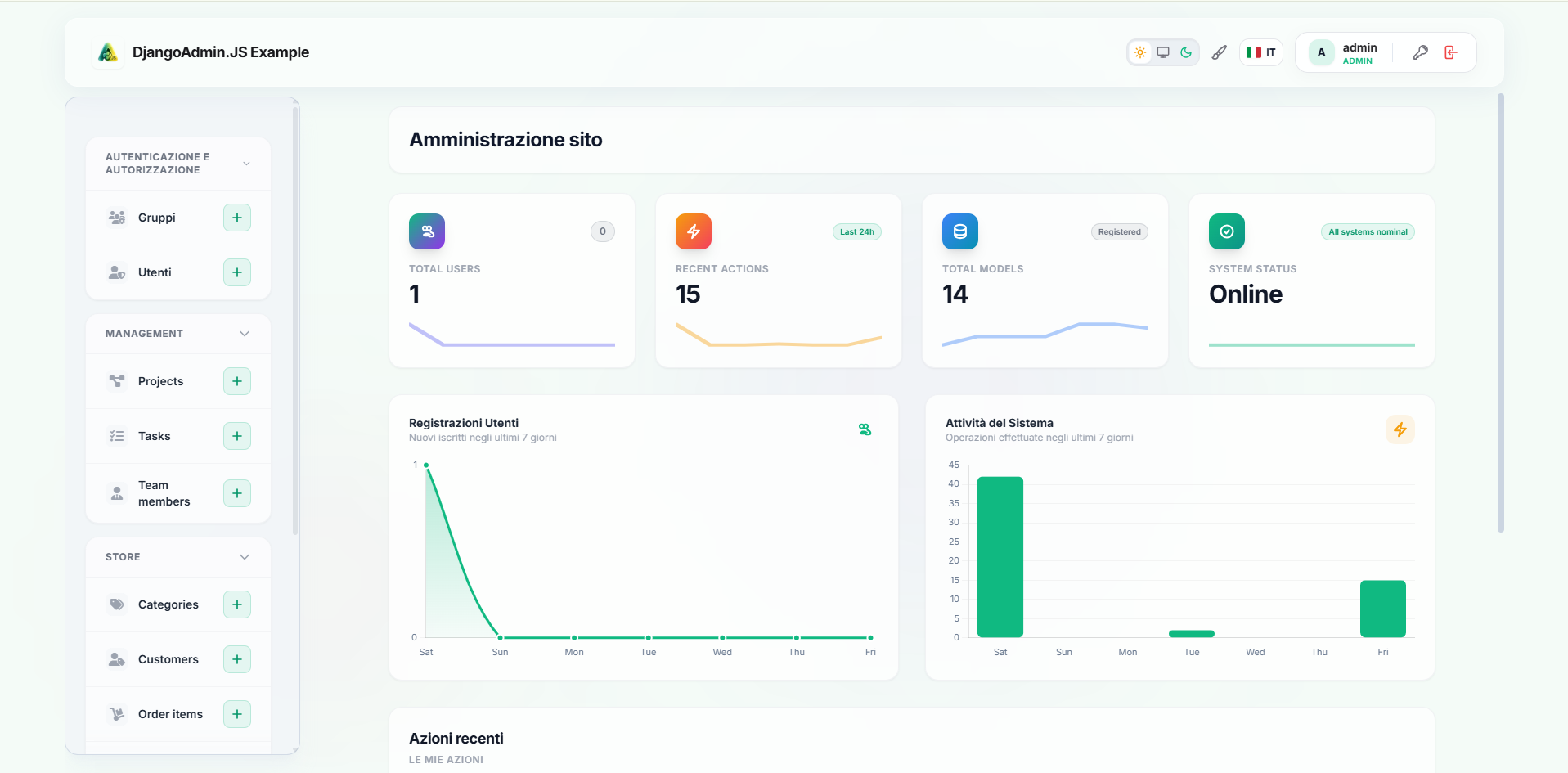
Modern Django Admin Interface
Explore the different views and visual enhancements of the theme. Click on the tabs below to switch previews.
Quick Installation
Integrate DjangoAdmin.JS into your workspace in less than 2 minutes.
Install the Package
Run the following command in your terminal to install the latest stable package via PyPI:
pip install django-admin-js
Register App & Middleware
Update your settings.py file. First, add django_admin_js before django.contrib.admin. Then, add the middleware to the beginning of your MIDDLEWARE list:
INSTALLED_APPS = [
    "django_admin_js",  # Add this before Django Admin
    "django.contrib.admin",
    "django.contrib.auth",
    ...
]
MIDDLEWARE = [
    "django_admin_js.middleware.DjangoAdminJSMiddleware",  # Add at the top
    "django.middleware.security.SecurityMiddleware",
    ...
]
Configure Customize Preferences (Optional)
You can set default visual presets, themes, and behavior controls using the following global configuration dictionary in your settings.py:
DJANGO_ADMIN_JS = {
    "ERROR_LEVEL": "title",      # Error display level: generic, title (default), stacktrace
    "LIVE_SEARCH": True,         # Live filtering as-you-type
    "LIVE_SEARCH_MIN_CHARS": 3,  # Minimum characters to start search
    "LIVE_SEARCH_DEBOUNCE_MS": 300, # Debounce delay in ms
    "THEME_PICKER": True,        # Show the layout/color switcher widget
    "LANGUAGE_SWITCHER": True,   # Show the language switcher widget
    "LANGUAGES": [
        ("it", "Italiano", "fi fi-it"),
        ("en", "English", "fi fi-gb")
    ], # Available languages (code, name, optional_icon_class_or_emoji)
    "DEFAULT_THEME": "indigo",   # Preset choices: indigo, emerald, rose, amber, ocean, violet
    "THEME_STYLE": "default",    # Layout choices: default, glassmorphism, minimalist
    "SIDEBAR_COLLAPSIBLE": True, # Enable/disable collapsible sidebar app sections
    "SIDEBAR_COLLAPSED_DEFAULT": False, # Collapse all sidebar sections by default
    "SITE_HEADER": "My Custom Admin", # Custom brand header text
    "SITE_LOGO": "/static/my_app/logo.png", # Custom brand logo image path
    "IMPERSONIFICATION": True,   # Enable/disable user personification (Login As)
    "IMPERSONIFICATION_REDIRECT": "", # Custom redirect path upon starting personification
    "CUSTOM_LINKS": {            # Add custom links to existing apps or create new sections
        "store": [
            {
                "name": "Custom Report",
                "url": "/admin/custom-report/",
                "icon": "fa-solid fa-chart-line",
            }
        ],
        "external_tools": [
            {
                "name": "Google",
                "url": "https://google.com",
                "icon": "fa-brands fa-google",
            }
        ]
    },
    "MODEL_ICONS": {             # Map models/apps to FontAwesome classes or Heroicon keys
        "auth.user": "fa-solid fa-user-shield",
        "auth.group": "fa-solid fa-users-gear",
    },
    "CUSTOM_MODEL_ACTIONS": {    # Custom buttons/actions per model on list views
        "store.order": [
            {
                "name": "Export Report",
                "url": "/admin/store/order/export/",
                "icon": "fa-solid fa-file-export",
                "class": "bg-indigo-650 text-white hover:bg-indigo-700", # Optional CSS classes
                "target": "_blank", # Optional target attribute
            }
        ]
    }
}
Client-side JavaScript API
Interact with the DjangoAdmin.JS interface dynamically from your custom scripts.
Show Alerts / Toasts
DjangoAdmin.JS exposes a global class DjangoAdminJS. You can programmatically trigger toast notifications matching the dashboard theme directly in your views, custom layouts, or dynamically loaded elements:
// Show a warning alert
DjangoAdminJS.showAlert("Attenzione, operazione non consentita!", DjangoAdminJS.ALERT_SEVERITY.WARN);
Signature
DjangoAdminJS.showAlert(message, severity, duration = 5000)
Parameters
message(String): The plain text or HTML content to show in the alert.severity(String): The alert severity level. Choices are members ofDjangoAdminJS.ALERT_SEVERITY.duration(Number, optional): Autohide delay in milliseconds. Defaults to5000.